Showing posts with label Error. Show all posts

Tuesday, 26 March 2013

HP Scanjet 4370 browse devices not found

I have a computer suite with 5 x HP Scanjet 4370's. One of them can't be found on the attached computer. I have moved it from machine to machine and no machines seem to find it. The other scanners work fine. So it is clearly something wrong with this one.

On plugging it in to the power it makes the usual noises. Also when you reboot the machine and it is connected to the USB port it works.

When you load up HP Scan and click browse it just says 0 Devices found:
The only real obvious thing to suspect is the USB port. After opening the scanner up, I found no evidence of loose connections or shorted circuits.

Looks like this ones a gonna.

Tuesday, 27 November 2012

Photoshop could not save because of a disk error

Well, quite recently students have been having trouble saving from Photoshop CS5 version 12.0.

It comes up with:
It's strange because if you try multiple times, sometimes it saves and others it comes up with the error.
Could not save as because of a desk error.

Looking in the console log I found these entries:

26/11/2012 16:09:36 /Applications/Adobe Photoshop CS5/Adobe Photoshop CS5.app/Contents/MacOS/Adobe Photoshop CS5[1697] Allocator race detected: transaction is not verified for -103/2 - _mac_bind/Library/Preferences/Adobe/Color/ACEConfigCache2.lst
26/11/2012 16:09:48 /System/Library/CoreServices/Dock.app/Contents/MacOS/Dock[1652] Allocator race detected: transaction is not verified for -103/248 - Untitled-4.psd
26/11/2012 16:09:49 kernel smb_maperr32: no direct map for 32 bit server error (0xc0000279)

It seems to be a problem with users whose home drive is on Windows 2003 or before shares. Luckily I have my home drive on a Windows 2008 share.

Looking on the internet for the kernel error I found this down in the "Mac OS X bug: Empty oflders when browsing Samba shares on Windows 2003 Server". He gets the error when looking in sub-folders on a Windows 2003 server. Might be related.

Tried it with my login with my home drive on Windows Server 2008 share and works without problems.

So far I've tried:

  • OS X 10.7.4
  • OS X 10.6.6
  • OS X 10.6.8
  • Photoshop CS5 12.0.4
  • Redirecting ~/Library/Application Support/Adobe/ to a local folder
Just had a very similar problem with Windows PC's. Students trying to save from Photoshop to their home drive came up with a similar error:
Could not save as because the file could not be found
It looks like it's a server problem as it happens on both Windows and Mac. I shall update when I find out more.

Monday, 5 November 2012

HP Designjet 500 error 02:10 ribbon problems- trailing cable

I went to use the HP Designjet 500 and upon switching it on I noticed the print carriage stopping abruptly half way along the bed. Looking inside I noticed the ribbon which connects to the carriage was crumpled and had dried ink all over it. Thought this was causing the problem because it was unable to slide along with the carriage so I cleaned it.

After this it's had a few problems loading the paper, and also whilst printing. Just noticed this "System Error 02:10".

Found a few forums on the subject referring to the carriage and print heads. Replaced yellow printhead adn while it was performing an alignment it came up with:
System Error:  79:04

Found this (right at the bottom) one saying it was the connection with the ribbon cable. Looks like it's not getting the right 2.5V signal from the carriage. Needs reseating. Otherwise replace the cable.

The trouble is: How to get into the printer to reseat the cable? Looks like a bit of work.

Found a quick little tutorial on how to get the main cover off. Simply remove the three screws (hex) on the back main part. I unclipped the lift up cover, and you need to unclip the main cover by lifting it up.

Not sure how to remove the side panels.

I reseated the cables on the print carriage but after doing about 2 inches of print on a 36" roll it came up with this error again.

Found a service manual for the HP Designjet 500.
The error is found in section 2-8, carriage failure. It says to replace the Carriage Assembly, but my suspisions point to specifically the "Trailing Cable" as this was quite bent, possibly shorting when the carriage is moving.
To replace the "Trailing Cable" go to section 8-40

Looks like the trailing cable is about £15 so pretty cheap to try out.

If this doesn't work perhaps a carriage assembly. About £120 refurbished, or £350 new


Note ...................
7th Feb 2013
So, it's 3 months on and I finally got the chance to install a new "Trailing Cable". Nothing to note about changing the cable over, the manual is quite self explanatory. The only thing I found was that the torx screws were not size T20, were actually a size or two smaller.

After installation it worked perfectly!

Fixed.

Thursday, 12 April 2012

MacBook Pro Trackpad "not working properly" in Windows XP

Whenever I reimage MacBook Pro's with Windows XP I always have the same problem with the trackpad.

When you boot up, the trackpad does not function. Logging in and going to device manager you see that there is an exclamation mark over the trackpad. It simply says something like:

This device is not working properly. Error 16

Uninstalling, reinstalling, disabling, enabling does not fix it.

I reinstalled Bootcamp 3.0 drivers which did not help.

I found this forum quite interesting. Seems to mention about uninstalling some Windows Apple things in "Add/Remove Programs". But I didn't try this.

I next updated to Bootcamp 3.1 drivers and rebooted. Worked a treat!


.............
Update - 24/09/2012

Well, just reimaged a macbook pro and the same problem occurred. Installed Bootcamp 3.1 and it didn't work!

Finally had a look at the forum mentioned above and the solution they gave worked. More specifically:

  1. go to Device Manager and update the driver for the trackpad.
  2. click "No, not this time" for internet update.
  3. Click, "install from a list or specific location".
  4. click, "Don't search, I will choose a driver to install"
  5. Choose the generic driver.
  6. Click finish
The trackpad starts to work but no multitouch facilities. This is the point you install/reinstall bootcamp 3 and 3.1.

After this it works a treat.

Thursday, 22 March 2012

Windows Vista Laptop dwmredir.dll error on login

A staff member brought their laptop in. Upon booting it up it auto logs in but before it can load the desktop or anything it comes up with the error:


"C:\Windows\system32\dwmredir.dll is either not designed to run on Windows or it contains an error. Try installing the program again using the original installation media or contact your system administrator or the software vendor for support.


Found this microsoft tech forum which suggests:


  1. restore to just before this happened - unfortunately there is no restore points!!
  2. try a clean boot
    1. goto -> run -> msconfig
    2. disable startups
    3. disable non microsoft startups
    4. try and rule out which one is causing it
  3. tryed these to no avail. Still no desktop
Found this forum which says to run some error checking thing called "System File Checker". From command line type:


sfc /scannow

............

I've just found this post under "drafts". Looks like I didn't finish the post. From what I remember, I think I booted in Safe Mode, turned on the installation service (see previous post), installed Tune Up Utilities and ran "One Stop Maintenance". I think this is how I fixed it.


Simple.

Adobe Creative Suite 5 - keeps asking for serial number

I recently installed Adobe CS 5 on a Windows Vista laptop. During the initial stage of the installation it did ask for a serial for which I put in the correct numbers. It told me everything was fine and installed.

I then tried opening Adobe Photoshop and it came up with the a dialogue box asking for the serial. I put it in, it gave me the green tick and told me everything was fine. The dialogue box disappeared and then reappeared wanting me to put in the serial, in a continual loop.

I tried serveral logins' including the administrators but none worked. I also tried a reboot.

I must mention that this laptop had Adobe CS3 installed previously which had stopped working due to a licensing error.

After trawling through the internet I initially found this post, and he posts again to say he has found a forum and found the only fix was to delete a database file. He failed to say which file, or even which post he had found!!

After some more looking, specifically for Adobe CS databases, I found this post. It mentions deleting:
C:\Program Files (x86)\Common Files\Adobe\Adobe PCD\cache\cache.db


I found the file, renamed it and tried Adobe again. Put in the serial and it works beautifully.


My conclusion was that this file had either gotten corrupt or had the wrong permissions.

Friday, 27 January 2012

Apple Remote Desktop Task Server trouble

Just after rebooting the xserver I noticed an error in the logs made by ARDAgent:

Jan 27 14:20:19 Xserve ARDAgent[460]: Bind error on TCP port 3283.  Error number: 48 Address already in use

Looking at remote desktop on my machine I noticed it was having trouble communicating with the task server. I tried restarting the ARD service to no avail.

I looked through some more logs as it appeared that something else had taken that port. The only logical things would have been iChat and another VNC service running. I checked IChat out and it wasn't running. I did find another log entry just after reboot, but before the ARD error which was registered to OSXVNC. Sure enough this was running. I shut down the service and made sure it wasn't starting up any more at startup.

As soon as this was done the task server was back up!

Monday, 19 December 2011

CD and DVD drives "Device cannot start" error 10 in device manger - Windows

A member of staff brought in their PC today saying that the DVD drives (there are two) don't work.

Looking in Device manager I found that both DVD drives were down as CD drives and in the details it says something along the lines of:
The device cannot start error 10

My first idea was to do with Master and Slave jumper switches on the back of the DVD drives. Tried all the combinations. For some the drives came up as their actual names, but still came up with the error message.

After this I did a system restore to its' earliest point. Still no luck.

I finally thought it had to do with iTunes. I've experienced it before, when installing iTunes the CD drive stops working in Windows. I had a search around on google and found this forum. It seemed promising and pointed towards this Microsoft troubleshooting guide.

Also, another tutorial is here from Apple who admit the problem.

Although this was to do with Windows XP and error 31 I found other forums mentioning the registry and "Upper Filters" and "Lower Filters". I deleted the UpperFilter registry entry mentioned and it worked a treat.

Basically:

  1. load up Regedit by going to Start > Run > Regedit
  2. go to:
    1. HKEY_LOCAL_MACHINE\SYSTEM\CurrentControlSet\Control\Class\{4D36E965-E325-11CE-BFC1-08002BE10318}
  3. delete the UpperFilter, usually at the bottom
  4. Reboot the machine
Done

Friday, 25 November 2011

Illustrator Can't Locate the Startup Proiles

A tutor was having trouble on her machine. Whenever she loaded up illustrator it would come up with this error message:


Can't locate the Startup Profiles. Please try after installing illustrator again.
Illustrator will now attempt to create a default document

I noticed that it also happened on any networked login, but not local logins.

Her machine was a little different then the typical set up. I had enabled "Force Local Home" on the active directory accounts.

After a bit of investigation I eventually ruled it down to NHR. I had just installed it on all machines (see how I fixed NHR) including hers (even though it didn't actually need it). I found that the directories inside - ~/Library/Application Support/Adobe were symbolic links and the "Force Local Home" option didn't work with this very well (I don't know why though).

Anyway, as the NHR thing fixes the problems she was having with her networked home, I've just unticked the "Force Local Home" on Active Directory accounts.

I also had this problem with another machine and to fix it I removed NHR from the com.apple.loginwindow.plist file:

sudo defaults delete com.apple.loginwindow LoginHook
sudo defaults delete com.apple.loginwindow LogoutHook

It basically means it doesn't load at login or logout.

Thursday, 10 November 2011

Photoshop CS 5 3D rotate opengl error

Had an error with a machine a student was using. The error happened when trying to 3D rotate the document. It read:

Could not complete your request because it only works with OpenGL enabled document windows.

Whilst being slightly helpful as to hinting at the problem, I do wish it would try and solve the problem itself. After doing a quick search on the internet I found a nice little Adobe Forum quickly explaining that you need to have an OpenGL compliant graphics card. This didn't help either because just about everyone does!!

So I found another forum saying that OpenGL has to be enabled in Photoshop, and as a default on Windows XP it is switched off (bad move).

I eventually worked out where the tick box was (which wasn't explained in the forum!!!)


  1. Go to Edit > Preferences > Performance...
  2. Click on Enable OpenGL Drawing.


Of course now I find out that another machine doesn't have a graphics card (it's onboard). Doh!

Friday, 4 November 2011

Adobe CS 5 Error 16 - uninstall and reinstall adobe product

Just came across this today on a staff machine. When they tried to use indesign it would crash almost immediately. I then logged in under a local account and tried to use any of the Adobe Creative Suite products, all of which showed this error straight away.

I rebooted, reseting the PRAM and running /sbin/fsck -yf. No changes were made to the operating system and Adobe CS 5 still came up with this error, so the problem wasn't here.

I read up on it and it looked like it has something to do with licensing. I finally logged in as Root and tried all the Adobe products, and IT WORKED!

After running this it worked on all local logins.

Coincidentally, when the staff member logged in and ran indesign, it crashed straight away (no error). After this the error 16 occurred on all logins!! So it was something with her account which much change something somewhere. I shall look into this!

Tuesday, 4 October 2011

Office 2008 and 2011 cannot save or create this file

Upon updating the operating system to OS X 10.6.6, I've found that saving office documents throws up a lot of error messages. It has to be noted that this is only happening for staff logging in through Active Directory. These are the error messages that are coming up:
Word cannot save or create this file. The disk may be full or write-protected.
Word cannot save this document due to a naming or permissions error
The "Word cannot save or create this file" error appeared only for staff saving docx files on an old Server 2000 share.

It is my understanding that the other error ("Word cannot save this document") is cause when saving a .doc file when the .TemporaryItems folder stored in the root directory of the home drive either isn't there or does not have the right permissions. I found this forum which talked a little of the problem

After some searching around I found this very informative webpage on saving issues with Word and other Office applications.

With help from the ICT Technicians we've deduced it is a problem with the staff having home drives on a Windows Server 2000 share, as the students do not have this problem with their home drives on a Windows Server 2003 share.

We hence tried moving a home directory to a Windows Server 2008 share. This fixed the problem of saving .docx files, but we had the .doc error "Word cannot save this document due to a naming or permissions error". I'm assuming this is caused by the .TemporaryItems folder issues, but this needs testing.

Another thing to test was the operating system, as it is suggested that the problem is caused by Apple. It did appear to work very well on OS X 10.6.8, Office 2008 on a Windows Server 2008 share.

We did test this quite extensively, even trying the new Office 2011, which still showed up with error messages.

We now have a few options:
  1. Move staff home folders to a Windows Server 2003/2008 share
  2. Change the OS X active directory login settings to "Force Local Home", and get a script which automounts their home as a networked volume on login.
The first option is out of my hands but I have started the ball rolling. The second option would mean the users would have to change their habbits, and change always comes with friction. My prefered option is No.1.

Thursday, 7 July 2011

Setting up the new 27" iMacs

Setup started with the simple "hold down the n button" to netboot/netinstall. The first problem was that the current netinstall image would not work on the new iMacs, doh! So I set about making a new one. The old deploy studio RC20 seems to crash whilst making an image, so I needed to use a newer one. This newer one imaged without crashing, but when netbooting came up with a message saying the server needed updating to cope with the new netboot image.

The next thing I tried was to put an iMac in target disk mode and just reimage it using a 24" imac with I know works. I put the Mac Pro 10.6.6 image on it but would not boot up. This was probably due to new drivers not being on the image!

My last attempt is to start from scratch (or nearly from scratch) and install everything. I updated the operating system to the latest 10.6.8. I took a shortcut though and used "Migration Assistant" to pull across applications from the 10.6.6 image. This worked and only required me to install the newest of things. Heres a list of things which is now on the new iMac:

  • Adobe CS5
  • Final Cut Studio
  • Firefox 4
  • Acrobat 9 Pro
  • Papercut client
  • Celtx
  • Office 2008 (required rosetta)
  • Handbrake
And drivers
  • Scanwizard
  • Dell 3110 driver
  • Pixma Driver
  • Konica Driver
  • HP Scanner 4370
  • Wacom tablet
  • Flip4Mac
After all this I tried a students account. It required 2 login attempts to get me in though. I then tried all the apps. The problems I encountered were:
  • Photoshop crash on launch
  • Illustrator crash on launch
  • Indesign crash on launch
  • Acrobat crash on launch
These were probably due to NHR (network home relocation) script not installed. I installed it and Photoshop and Acrobat started working. Unfortunately Illustrator nor InDesign would work! They worked perfectly fine on a local login. I ran the CS5 install again, and also updated Illustrator to 15.0.2 and InDesign to 7.0.4. Illustrator would crash on load up, and indesign would crash on the "new document" screen which comes up first. My only clue was a message which popped up in console which I can't quite remember now. Something to do with transport2app error 255.

Just relogged in and tried it again. The error's I'm getting from the console are:

07/07/2011 14:01:43 kernel smbfs_vnop_link: warning: pid 665(Adobe Illustrato) hardlink(~v3vZO_cBdNvr4jqB)
07/07/2011 14:01:49 mdworker32[673] kCGErrorFailure: Set a breakpoint @ CGErrorBreakpoint() to catch errors as they are logged.
07/07/2011 14:01:51 mdworker[658] CFPropertyListCreateFromXMLData(): Old-style plist parser: missing semicolon in dictionary.

The first refers to the smbfs (samba file system) which must be the home drive of the student which is hosted on a windows share.

The only real difference is that the operating system in 10.6.8 instead of 10.6.6. I think I will have to redo this on a 10.6.6 machine....

So, redone a 10.6.6 version and migrated everything from 10.6.8 iMac. Everything worked! (apart from Adobe Acrobat and Dreamweaver. Acrobat crashes and dreamweaver gets stuck even loading up. I installed NHR and still the same. Interestingly Illustrator worked without NHR!

Looking into the issue a little more, I found that NHR is not entirely working. I've noticed that the caches folder is not being relocated, although the fonts folder is? I will have to look into this further. At the time I thought this was due to the test account having the links set up already from another machine, but thinking about it now these links should be deleted on logout! So now I'm thinking about it, it was originally working and now somehow it is not working any longer.


Wednesday, 4 May 2011

iPhone recovery

Well, after just getting an iPhone off eBay I've found it's got an error 1015, which means it was jailbroken! I've found a nice little tutorial here which might work.

Yep, it worked. But no sim. Ended up jailbreaking version 3.1.2 with blackrain but the new sim card doesn't work. I found this which looks promising. This has got a good list of all the firmwares that are available.

So, at the moment I have iOS 3.1.2 which is jailbroken with blackrain. The trouble is that it doesn't like the sim card. This might have something to do with the baseband. This is the firmware for the modem. I found this page giving a brief description. I have baseband 06.15.00. This person has baseband 05.14.02 and his is locked to AT&T but he has iOS 4.2.1. I can only assume that this baseband does not like the modem (is not compatible). I would like to take it back to what it normally is.

In the end I would like a factory iphone and then go from there. I've found this which explains how to downgrade the baseband to something normal. This can be unlocked so it's not completely pointless.

I shall start by simply letting iTunes update the phone normally. It's probably going to go wrong but we'll see. Yep, doesn't like it, as soon as it reboots it goes straight back to the DFU.

I re-did it to version 3.1.3 and it says that the sim is not valid for this phone. It basically means that the phone is not "unlocked". I have two choices, one is unlock it officially, the other is to unlock it unofficially. It looks like o2 charge £15! But I recon that is worth it. But I need to find out which carrier it is locked to?

Well, after finding an old o2 card lying around the house (a bit of a fluke), looks like something different is happening. It now says "Waiting for Actiation" "This may take some time".

Just found an informative website which says that if you are not the original owner then it is difficult (maybe impossible) to get it unlocked!

Just found this post which says how you can get around the recovery loop in 4.2.1 version. - Didn't work!

So, I've just restored successfully to 4.1.0! Works beautifully. And now to unlock it. But first to jailbreak! So I've found this post. Bloody complicated but it's working at the moment. After this the plan is to install the unlocking software which is called ultrasnow.

Yep, worked a dream! Next was this post. A little long also, but worked also. Must note that it did come up with this error when installing ultrasnow. But seems fine.

Error
http://apt.saurik.com
netdv:open nodename nor servname provided, or not known


I did notice that it disconnected from the wireless and this might have prompted the error messages. Anyway, it now says "t-mobile" and I've just rang the home phone!! Yay!!!!!

Wednesday, 2 March 2011

Squid proxy server setup for iTunes authentication through another proxy

Yay, nice new shinny iPads. What could possibly go wrong. Doh! iTunes doesn't like the proxy server.

After speaking with the Network administrator, he showed me a mac already in use with ipod touches. The set-up on this machine uses a deamon called "Squid", which acts as a local proxy server. So this authenitcates itself with the real proxy server, and all programs on the machine communicate with squid as a localhost, so everything works just fine. It starts at startup,but I think it should start at login.

Here's the config files, squid.conf:


# ----------------------------------------------------------------------
# WARNING - do not edit this template unless you know what you are doing
# ----------------------------------------------------------------------

# the parent cache
cache_peer xxx.xxx.1.3 parent 8080 7 no-query no-digest no-netdb-exchange default login=username:password

# disk and memory cache settings

acl everything src all
cache deny everything
maximum_object_size 4096 KB

# store coredumps in the first cache dir
coredump_dir /usr/local/squid/var/logs

# the hostname squid displays in error messages
visible_hostname localhost

# log & process ID file details
cache_access_log /usr/local/squid/var/logs/squid-access.log
cache_log /usr/local/squid/var/logs/squid-cache.log
cache_store_log /usr/local/squid/var/logs/squid-store
pid_filename /tmp/squid.pid

# Squid listening port
http_port 8080

# Access Control lists
acl localhost src 127.0.0.1/32
acl to_localhost dst 127.0.0.0/8 0.0.0.0/32
acl manager proto cache_object
acl SSL_ports port 443
acl Safe_ports port 80 # http
acl Safe_ports port 21 # ftp
acl Safe_ports port 443 # https
acl Safe_ports port 70 # gopher
acl Safe_ports port 210 # wais
acl Safe_ports port 1025-65535 # unregistered ports
acl Safe_ports port 280 # http-mgmt
acl Safe_ports port 488 # gss-http
acl Safe_ports port 591 # filemaker
acl Safe_ports port 777 # multiling http
acl CONNECT method CONNECT
acl allowed src 127.0.0.1

acl godirect dstdomain .somewhere.co.uk

# Only allow cachemgr access from localhost
http_access allow manager localhost
http_access deny manager

# Deny requests to certain unsafe ports
http_access deny !Safe_ports

# Deny CONNECT to other than secure SSL ports
http_access deny CONNECT !SSL_ports

# protect web apps running on the proxy host from external users
http_access deny to_localhost

# rules for client access go here
http_access allow localhost
http_access allow allowed

# after allowed hosts, deny all other access to this proxy
# don't list any other access settings below this point
http_access deny all

# specify which hosts have direct access (bypassing the parent proxy)
always_direct allow godirect
always_direct deny all

# hierarchy stop list (squid-recommended)
hierarchy_stoplist cgi-bin ?

# refresh patterns (squid-recommended)
refresh_pattern ^ftp: 1440 20% 10080
refresh_pattern ^gopher: 1440 0% 1440
refresh_pattern -i (/cgi-bin/|\?) 0 0% 0
refresh_pattern . 0 20% 4320

always_direct deny all
never_direct allow all

To get this running there is some things to run, there might be a GUI. But thinking about it, the machine was running 10.6, and I'm running 10.5, doh! I'll have to check out if it works on this first.

So, it doesn't come with 10.5. Downloaded latest version and found this website. Didn't work. You need a compiler which doesn't come on the mac, doh! Tried installing GCC compiler, which doesn't work either! Doh!

So I searched for a GUI for Squid and found SquidMan. Works very nicely, with no messing about with compiling, yay. Had a little trouble getting it to work. What is also good is that you can manipulate the config file it uses! So I copied and pasted from above, but errors came up about permission to write to log files. I left the log files section alone and pasted the rest but it came up with permission denied.

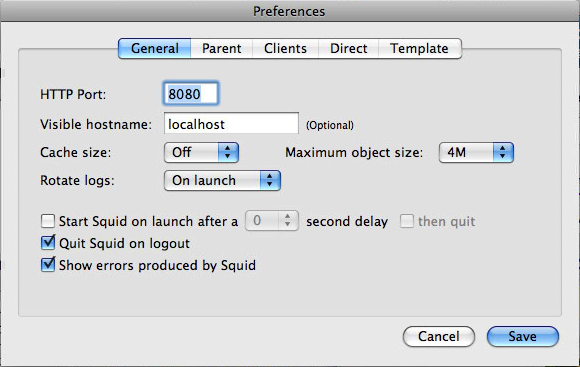
In the end, I just used the default settings, under General I put HTTP port to 8080, Visible hostame to localhost.


Under parent I put "Use a parent proxy server", hostname proxy.chesterfield.ac.uk port 8080, and ticked "Parent requires authentication. But putting username and password here doesn't seem to work. Leaving them blank asks you for a username and password when the service starts and works without putting domains in. Yay!


Thursday, 10 February 2011

iMac 21.5" - 11, 2 - 10.6.6 - Installation and deployment - Part 2

After NetInstalling OS X 10.5.8 on the new iMac I got a black screen. I still think it was worth a try.

So, I swapped the "fully updated" one for another new iMac so I could start at OS X 10.6.4. Tried Active Directory and it worked fine, as well as NHR login scripts. So I jumped to the conclusion that it was in the use of "Migration Assistant" that some 'damage' occurred. But, I was still cautious of updating the operating system any further. My plan is/was to update everything else, image it, then update the operating system to see if everything still works and carry on accordingly.

So, I had to start from scratch and installed:
  • Final Cut Studio 2 - had to install at least 3 times to get 'all' the files
  • Aperture
  • Adobe CS5
  • Adobe Acrobat Pro 9 - no serial number
  • CeltX
  • Audacity
  • iWork 09
  • Burn
  • ClickView
  • DivX
  • Firefox 3.6.13
  • Handbrake
  • Office 2008
  • Mplayer Ex...
  • DeployStudio RC20
  • NHRBasic
  • Flip4Mac
  • ARD Client 3.4
  • PCclient
  • Don't have "Logic" Disks on server
  • VLC 1.1.7

Scanners:
  • HP Scanjet 4370
  • Nikon CoolScan 8000
  • Scanwizard Pro 7.20

Printers:
  • 5550
  • 3110
  • Canon Pixma IP4500
  • Konica 7300

Tablets:
  • PenTablet 521-3 - I think this covers all the tablets we have.
Forgot also to add "Media" user to the local users.

I partitioned the HD via Boot Camp Assistant and formatted it as HFS+ Journaled, named "Scratch Disk". Just going to make the first image now.....

.... and now just updated to 10.6.6, and student login worked just fine! So to conclude, "Migration Assistant" probably isn't good for transferring apps across operating system versions.

I am now imaging using Deploy Studio, but having to clear a bit of space on the server so it can fit on. The space taken on the iMac is 85GB, it needed more then 130GB (not sure how much more) for doing server side compression, I've now freed up 200GB on the server. 78 mins till it's uploaded, but then it'll take the old server, bless the poor thing, quite a while to compress the image.

... I left it over night and it did it. A nice thing to note is that if you use a local repository, I think it doesn't use the server to compress the image.

Worked a charm, and even worked with multicasting, yay.

Tuesday, 8 February 2011

iMac 21.5" - 11, 2 - 10.6.6 - Installation and deployment

Just received 10 new 21.5" iMacs, version "11, 2" ,  with 10.6.6 installed. Very nice, with quad core and 1GB Hard Drives, but having a few different issues has caused me to put them back to 10.5.8 temporarily until the main issues are fixed.

To streamline the operation I decided rather then starting from scratch, I would use Migration Assistant to transfer accounts and applications from the latest MacBook Pro which had everything on. This worked very well, but in heinsight might have caused the issues below. These problems need testing on a fresh install of OS X 10.6.6.

Issues which I encountered:

  • Students on Active Directory require to put details in more then once before they can login, for machines only just switched on!! I think this is to do with how quick the mac boots up, too quick to authenticate itself on active directory?
  • NHR (Network Home Redirector) scripts not running at login or logout.
  • Deploy Studio netboot not working; firstly freezing on the white screen with the grey apple (no spinning wheel, and secondly crashing and rebooting when loading the next screen after the one just mentioned.
With the students active directory issue (not properly tested on staff accounts), there was not much to try as I think it is more of a problem with Active Directory Servers or how OS X 10.6.6 communicates with them, which is too time consuming at present (there is pressure to deploy iMacs within the next 2 days at most). I did some simply exploratory fixes:
  1. take off of active directory and put it back on
  2. make sure everything was up-to-date
  3. refer back to solution 1.
When there is more time I shall need to look into this, but also future releases of the operating system will fix these. One thing I would like to do is try active directory logins on a fresh install of the operating system

With NHR I downloaded the latest, 3.2.6, uninstalled and reinstalled. What might have caused the problems is that I transferred files from a MacBook Pro running 10.5.8, which might have transferred some of NHR Scripts but not all. I also tried the full version which creates more alias's. Unfortunately not much info on NHR website, no-one else seems to be having problems. One thing I would like to do is try the scripts on a fresh copy of 10.6.6.

After these two problems and diminishing time I decided it was best to revert to 10.5.8 until time would allow these problems to be resolved. But, I did not want my efforts to go to waste, so I decided to make a disk image of the machine with its' problems so I can continue later. Little was I to suspect any more issues. I held down 'N' for netboot to DeployStudio and the machine froze on the white screen with the grey apple (no spinning wheel). Doh! The problem was probably because the last deploy studio netboot image was made on a MacBook Pro 15" now 2 years old.

I subsequently made a new netboot image (nbi) from this iMac and tried again, this time to get the spinning wheel but to crash on trying to load the next screen! This was probably due to outdated DeployStudio (currently using RC14 on the server and RC 15 on clients). I updated the client to the latest and the same happened again! So I updated the server, but alas, the installer said the minimum requirements were not met!! Server is running 10.4.11!!! Needs updating!!! So I go traipsing around for the last version to support 10.4.11 server, which was a lot of hassle. I'd like to not that the DeployStudio website (both Wiki and main site) are not good for troubleshooting, with only the latest versions available. I finally found RC20 here. Eventually worked! Yay.

After this I went to make an image of the drive but alas, not enough room on the server. So I used Boot Camp Assistant in OS X 10.6.6, and partitioned the drive - 160GB for OS X and the rest for "Scratch Disk". I then NetBooted again and used Disk Utility to make a compressed Disk Image and put it on the Scratch. Turned out to be 79GB, original was 106GB.

So now to put OS X 10.5.8 on, which will hopefully work on this machine!!

Thursday, 13 January 2011

Mac OS X Power Saving Schedule via Command Line

I now have, or want to have, all computers booting up on weekdays at 8:30 which will give me a good idea of which ones are working and which aren't via Remote Desktop. Also I have them shutting down at 16:50 as they will not be needed after this time (apart from times when they might be doing updates/scripts but I'll just have to remember this problem)

I also plan on changing the schedule for Half Terms and holidays so no extra power is wasted.

To control it all the xserve is set up to manage machine preferences and so through Workgroup Manager I change the preferences. A problem I'm having is that not all machines boot up at 8:30 even though they all appear in good working order. To check/manage preferences from Remote Desktop (to troubleshoot also) you can use the command line:

pmset -g sched

This works well and gives you what the schedules are. So far they are telling the right schedules:

N251-04899 (192.168.32.22)
Repeating power events:
  wakepoweron at 8:30AM weekdays only
  shutdown at 4:50PM every day
Scheduled power events:
 [0]  wakeorpoweron at 01/14/11 08:30:00 by Repeating
 [1]  shutdown at 01/13/11 16:50:00 by Repeating

I'll update this more when I find out more.

Tuesday, 11 January 2011

Final cut pro "Preview Disabled"

So yesturday a student was capturing film from a DV deck. Logged out for break and logged back in and low and behold when in "Log and Capture" it said "Preview Disabled". So I tried different tapes, different computer, different user (cove), different PAL settings and refresh rates to no avail. Only thing I didn't try was different tape deck (all were in use).


A quick search on google came up with a few results:


  1. Switch from PAL to other and then switch back (should refresh it)
  2. View drop-down menu in FCP and clicking on 'Refresh AV devices'
  3. Trying leaving the camera on and plugged into your Mac and then reboot your computer
after this guess I'll do some more searching (maybe even in console)

Thursday, 18 February 2010

HP Colour Laserjet 5550 service error 49.4C06

Got a service error 49.4C06 error yesterday in N212. Wasn't able to clear it by switching it off and back on. I deleted the top job in the queue just incase this was blocking it (it was an ai file). Went to the printer and the error was still there (deleted the job from my room). I opened the printer and cleaned out the thing at the top (with the little cleaner thingy) and closed it up. Still error. Switched it off and back on. Error cleared.

I had a look on the internet and found this to occurance:
http://www.fixya.com/support/t1606568-error_message_49_4c06

and this error code explanation page:
http://www.printertechs.com/tech/error-codes/error-codes-20-49.php

It appears that the error is linked to the computer program sending the print job. Possibly illustrator in this case. It might be worth noting that on these computers it is set up with the HP Colour Laserjet 5500 driver and sends the job to the server with HP Colour Laserjet 5500 driver installed. Also, I've only noticed the error since we have installed PaperCut NG on the system. So there are a few variables which need testing.

Maybe the first thing to do would be to update the firmware on the printer though.