We use EBS and have recently upgraded to version 4 which isn't officially supported for Mac :(. But it does work, although we have intermittent cases when a user gets a white screen.
To fix, you simply need to delete the:
~/Library/Application\ Support/Microsoft/Silverlight
folder. Simple.
I noticed that on 10.7.4 machines the folder is read only.
Showing posts with label Safari. Show all posts
Showing posts with label Safari. Show all posts
Tuesday, 26 February 2013


Friday, 12 October 2012
Firefox not picking up the wpad auto config file
I've decided to setup firefox on the new Windows image but it turns out it doesn't like the options:
- Use system proxy settings
- this is the one I prefer as I can set it using group policy/workgroup manager
- Auto-detect proxy settings for this network
Whenever either of these are ticked you cannot browse the internet.
Had a quick search and think I've found the problem. The browser looks for the file:
http://wpad/wpad.dat
Now when I typed this in the address bar of; Safari, Internet Explorer and Google Chrome; they all downloaded the wpad.dat file. But Firefox was the odd one out as it just displayed the "Unable to connect" and "Problem loading page" errors.
Did a quick search and found this Knowledge Base Article describing how all other browser now use DHCP to help find this address, but Firefox only uses DNS. Also found it here in a blog and more importantly in Mozillas bug reports here (takes a while to load).
The fix apparently is to put a "DNS record for the WPAD server" (described here under 7.2.2)
Thursday, 17 May 2012
Safari Crashing on OS X 10.6.8 for Active Directory Users
It appears on the machines where they were 'accidentally' updated to OS X 10.6.8 (we currently run OS X 10.6.6), Active Directory users cannot run Safari as it crashes on launch. For local users Safari works fine. I have deleted the ~/Library/Safari/ folder and also the ~/Library/Preferences/com.apple.safari* files.
My initial conclusion is that Safari doesn't like the permissions on certain folders in the ~/Library folder. e.g. Caches folder. I am used to this issue hence the installation of the useful program "NHR" (Network Home Redirection"), which currently redirects the ~/Library/Caches folder to a local location. I shall look into pinning down which folder needs redirecting. I have found this post which suggests ~/Library/Safari/WebpageIcons.db causes crashes. I shall continue to add to this post.
My initial conclusion is that Safari doesn't like the permissions on certain folders in the ~/Library folder. e.g. Caches folder. I am used to this issue hence the installation of the useful program "NHR" (Network Home Redirection"), which currently redirects the ~/Library/Caches folder to a local location. I shall look into pinning down which folder needs redirecting. I have found this post which suggests ~/Library/Safari/WebpageIcons.db causes crashes. I shall continue to add to this post.
Friday, 30 September 2011
Making a pkg file for installing sendLogon for Bloxx on OS X
In a previous post I described how we're getting a new web filtering system called Bloxx, which needs the sendLogon program to be installed and run as a login script on all the Apple Macs (OS X).
I used Iceberg free application to make the PKG file as I've used it before with relative ease, and also couldn't find the latest official Apple PKG maker app!!
Its all working now so here's how I did it:
Note: There is potential also for adding to this a little script which changes the proxy settings to the system and maybe also Firefox, but it would be easier to control these settings through a .pac file or .wpad file.
I used Iceberg free application to make the PKG file as I've used it before with relative ease, and also couldn't find the latest official Apple PKG maker app!!
Its all working now so here's how I did it:
- Made a new project in Iceburg, and made a nice little folder to hold all the files needed (makes it easier to find things)
- I filled in the top section "Settings"
- Next was the "Scripts" section. I had to make a script which changed the com.apple.loginwindow plist file to add the LoginHook /usr/bin/login.sh
- I ran nano from the command line (nano ~Desktop/sendLogonfiles/Install\ sendLogon/writeloginhook.sh)
and typed: - #!/bin/tcsh
sudo defaults write com.apple.loginwindow LoginHook /usr/bin/login.sh - I found I had to put "sudo" into the script so that it had the right permissions to write to the file. Not sure why else it didn't work?
- I saved the file and made the file executable - chmod 755 ~Desktop/sendLogonfiles/Install\ sendLogon/writeloginhook.sh
- I then added this script to the "PostFlight" script, and set the path to "Relative". Note - I found an article here documenting the definition of each of these types of scripts. Most were concerned with whether this was an upgrade or not, and would only run once.
- Finally was the "Files" section.
- I firstly put the files in the project folder.
- I set these files with the correct permissions (as in the tutorial folder for sendLogon). chmod 755
- Then, in Iceberg, I had to add the folders; /usr/ and /usr/bin/, which were not there.
- I then made the "Default Destination" the /usr/bin/ folder
- Finally I added the login.sh file and the sendLogon file.


Note: There is potential also for adding to this a little script which changes the proxy settings to the system and maybe also Firefox, but it would be easier to control these settings through a .pac file or .wpad file.
Friday, 9 September 2011
WallSpaceVidualArts coming soon
Just made the coming soon front page for the website www.wallspacevisualarts.co.uk. All works well, apart from in Firefox 4.0.1. Have a look at this:
Looks like Firefox 4.0.1 either makes the text too big, or makes the gaps (padding and margins) too big. Quite frustrating. Might be because I used em's for the font size?
Yep, worked it out in the end:
So, I started by changing margins which had no effect. I then tried changing font size from 'em' to 'pt', but this didn't work either. Finally tried the old 'line-height', changing from 'em' to 'px' which fixed it. Safari and Firefox are not the same when it comes to 'em's and 'line-height'. I still don't exactly know what 'em' means, but I'm sure I'll look it up one of these days.
Also to note was the slight differences in title formating. I used h1, h2 and h3 for the headers and footers, and there was a slight inconsistency with margins on them. Had to set them to 0px.
Also, for the "JOHN KING" text and phone number, I put a little bit of 'word-spacing' using 'em's, this is inconsistent between these browsers, so I changed it to 'pt'.
I also manually changed the margins for the '
' paragraphs. This is what gives it a bit of space at the top and bottom. I manually changed these so that I could determine the exact distance between the top and bottom of the main text.
 |
| Firefox 4.0.1 in background, Safari 5.0.4 in foreground. Notice you can't see the bottom email address in Firefox, and the last part of the phone number |
Looks like Firefox 4.0.1 either makes the text too big, or makes the gaps (padding and margins) too big. Quite frustrating. Might be because I used em's for the font size?
Yep, worked it out in the end:
 |
| Firefox 4.0.1 in background, Safari 5.0.4 in foreground - fixed inconsistency |
Also to note was the slight differences in title formating. I used h1, h2 and h3 for the headers and footers, and there was a slight inconsistency with margins on them. Had to set them to 0px.
Also, for the "JOHN KING" text and phone number, I put a little bit of 'word-spacing' using 'em's, this is inconsistent between these browsers, so I changed it to 'pt'.
I also manually changed the margins for the '
' paragraphs. This is what gives it a bit of space at the top and bottom. I manually changed these so that I could determine the exact distance between the top and bottom of the main text.
Wednesday, 2 March 2011
Squid proxy server setup for iTunes authentication through another proxy
Yay, nice new shinny iPads. What could possibly go wrong. Doh! iTunes doesn't like the proxy server.
# ----------------------------------------------------------------------
# WARNING - do not edit this template unless you know what you are doing
# ----------------------------------------------------------------------
# the parent cache
cache_peer xxx.xxx.1.3 parent 8080 7 no-query no-digest no-netdb-exchange default login=username:password
# disk and memory cache settings
acl everything src all
cache deny everything
maximum_object_size 4096 KB
# store coredumps in the first cache dir
coredump_dir /usr/local/squid/var/logs
# the hostname squid displays in error messages
visible_hostname localhost
# log & process ID file details
cache_access_log /usr/local/squid/var/logs/squid-access.log
cache_log /usr/local/squid/var/logs/squid-cache.log
cache_store_log /usr/local/squid/var/logs/squid-store
pid_filename /tmp/squid.pid
# Squid listening port
http_port 8080
# Access Control lists
acl localhost src 127.0.0.1/32
acl to_localhost dst 127.0.0.0/8 0.0.0.0/32
acl manager proto cache_object
acl SSL_ports port 443
acl Safe_ports port 80 # http
acl Safe_ports port 21 # ftp
acl Safe_ports port 443 # https
acl Safe_ports port 70 # gopher
acl Safe_ports port 210 # wais
acl Safe_ports port 1025-65535 # unregistered ports
acl Safe_ports port 280 # http-mgmt
acl Safe_ports port 488 # gss-http
acl Safe_ports port 591 # filemaker
acl Safe_ports port 777 # multiling http
acl CONNECT method CONNECT
acl allowed src 127.0.0.1
acl godirect dstdomain .somewhere.co.uk
# Only allow cachemgr access from localhost
http_access allow manager localhost
http_access deny manager
# Deny requests to certain unsafe ports
http_access deny !Safe_ports
# Deny CONNECT to other than secure SSL ports
http_access deny CONNECT !SSL_ports
# protect web apps running on the proxy host from external users
http_access deny to_localhost
# rules for client access go here
http_access allow localhost
http_access allow allowed
# after allowed hosts, deny all other access to this proxy
# don't list any other access settings below this point
http_access deny all
# specify which hosts have direct access (bypassing the parent proxy)
always_direct allow godirect
always_direct deny all
# hierarchy stop list (squid-recommended)
hierarchy_stoplist cgi-bin ?
# refresh patterns (squid-recommended)
refresh_pattern ^ftp: 1440 20% 10080
refresh_pattern ^gopher: 1440 0% 1440
refresh_pattern -i (/cgi-bin/|\?) 0 0% 0
refresh_pattern . 0 20% 4320
always_direct deny all
never_direct allow all
 In the end, I just used the default settings, under General I put HTTP port to 8080, Visible hostame to localhost.

After speaking with the Network administrator, he showed me a mac already in use with ipod touches. The set-up on this machine uses a deamon called "Squid", which acts as a local proxy server. So this authenitcates itself with the real proxy server, and all programs on the machine communicate with squid as a localhost, so everything works just fine. It starts at startup,but I think it should start at login.
Here's the config files, squid.conf:
# ----------------------------------------------------------------------
# WARNING - do not edit this template unless you know what you are doing
# ----------------------------------------------------------------------
# the parent cache
cache_peer xxx.xxx.1.3 parent 8080 7 no-query no-digest no-netdb-exchange default login=username:password
# disk and memory cache settings
acl everything src all
cache deny everything
maximum_object_size 4096 KB
# store coredumps in the first cache dir
coredump_dir /usr/local/squid/var/logs
# the hostname squid displays in error messages
visible_hostname localhost
# log & process ID file details
cache_access_log /usr/local/squid/var/logs/squid-access.log
cache_log /usr/local/squid/var/logs/squid-cache.log
cache_store_log /usr/local/squid/var/logs/squid-store
pid_filename /tmp/squid.pid
# Squid listening port
http_port 8080
# Access Control lists
acl localhost src 127.0.0.1/32
acl to_localhost dst 127.0.0.0/8 0.0.0.0/32
acl manager proto cache_object
acl SSL_ports port 443
acl Safe_ports port 80 # http
acl Safe_ports port 21 # ftp
acl Safe_ports port 443 # https
acl Safe_ports port 70 # gopher
acl Safe_ports port 210 # wais
acl Safe_ports port 1025-65535 # unregistered ports
acl Safe_ports port 280 # http-mgmt
acl Safe_ports port 488 # gss-http
acl Safe_ports port 591 # filemaker
acl Safe_ports port 777 # multiling http
acl CONNECT method CONNECT
acl allowed src 127.0.0.1
acl godirect dstdomain .somewhere.co.uk
# Only allow cachemgr access from localhost
http_access allow manager localhost
http_access deny manager
# Deny requests to certain unsafe ports
http_access deny !Safe_ports
# Deny CONNECT to other than secure SSL ports
http_access deny CONNECT !SSL_ports
# protect web apps running on the proxy host from external users
http_access deny to_localhost
# rules for client access go here
http_access allow localhost
http_access allow allowed
# after allowed hosts, deny all other access to this proxy
# don't list any other access settings below this point
http_access deny all
# specify which hosts have direct access (bypassing the parent proxy)
always_direct allow godirect
always_direct deny all
# hierarchy stop list (squid-recommended)
hierarchy_stoplist cgi-bin ?
# refresh patterns (squid-recommended)
refresh_pattern ^ftp: 1440 20% 10080
refresh_pattern ^gopher: 1440 0% 1440
refresh_pattern -i (/cgi-bin/|\?) 0 0% 0
refresh_pattern . 0 20% 4320
always_direct deny all
never_direct allow all
To get this running there is some things to run, there might be a GUI. But thinking about it, the machine was running 10.6, and I'm running 10.5, doh! I'll have to check out if it works on this first.
So, it doesn't come with 10.5. Downloaded latest version and found this website. Didn't work. You need a compiler which doesn't come on the mac, doh! Tried installing GCC compiler, which doesn't work either! Doh!
So I searched for a GUI for Squid and found SquidMan. Works very nicely, with no messing about with compiling, yay. Had a little trouble getting it to work. What is also good is that you can manipulate the config file it uses! So I copied and pasted from above, but errors came up about permission to write to log files. I left the log files section alone and pasted the rest but it came up with permission denied.
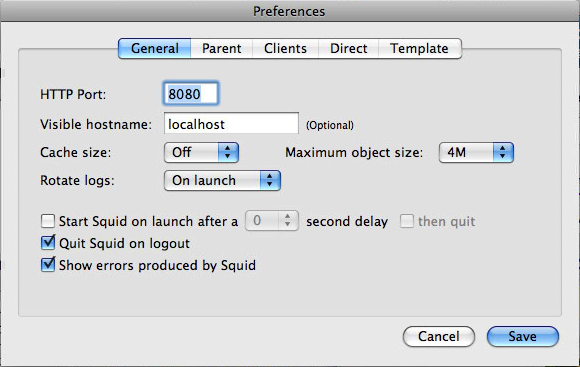 In the end, I just used the default settings, under General I put HTTP port to 8080, Visible hostame to localhost.
Under parent I put "Use a parent proxy server", hostname proxy.chesterfield.ac.uk port 8080, and ticked "Parent requires authentication. But putting username and password here doesn't seem to work. Leaving them blank asks you for a username and password when the service starts and works without putting domains in. Yay!
Tuesday, 22 June 2010
Safari 5 crashing on network accounts in 10.5.8
Well, thought I'd upgrade to Safari 5 because I love Safari. First off I had to update to 10.5.8. Then I discovered Safari wouldn't even load! I had to revert to Firefox which has problems with active directory and doesn't save history or bookmarks!
Finally got fed up with Firefox and found the solution in an Apple forum:
http://discussions.apple.com/thread.jspa?threadID=2461496&tstart=75
Specifically - defaults write com.apple.Safari WebIconDatabaseEnabled -bool NO
Problem solved!!
Finally got fed up with Firefox and found the solution in an Apple forum:
http://discussions.apple.com/thread.jspa?threadID=2461496&tstart=75
Specifically - defaults write com.apple.Safari WebIconDatabaseEnabled -bool NO
Problem solved!!
Subscribe to:
Posts (Atom)