So, I'm just getting started with Drupal and just installed the Backup and Migrate module. When I tried a backup to a folder on the same server it came up with an error. It was basically saying that this folder was not private and anyone can access it.
Thought I'd take a quick look into it. Turns out that the folder in question - sites/default/files/private/backup_migrate/manual/
can be read by anyone, therefore files are not safe.
So, how do you make it 'private'. Well, a good test is to try and navigate to the file:
sites/default/files/private/backup_migrate/manual/test.txt
which automatically gets made. I typed it into a browser and it loaded up. Simple.
So, to limit access depends on you hosting provider. I'm with Daily.co.uk, and they suggest using .htaccess files. I found this nice article on the subject, worth reading through properly.
I found that this command at the top of the .htaccess file (which was already in the folder) solved the problem:
AllowOverride All
I figure it's telling the Apache server to override all options.
Showing posts with label access. Show all posts
Showing posts with label access. Show all posts
Sunday, 30 March 2014


Friday, 14 September 2012
Sharing a MS Access database
So I've got an inventory database but have about 8 people who need to use it. Thought this wouldn't be a problem but turns out this stuff is more complex then it appears. When more then one person opens it (it's on a networked drive) a message keeps popping up about permissions. I did a quick search and found Microsofts help page here and there are a few options:
- Put it on a network folder
- done this which is where the problem is
- Split the database to front end and back end
- Use SharePoint
- Use a Database Server
The ideal one would be a database server. But unfortunately I lack the knowledge to create the queries and forms for the web.
Next best is either SharePoint or splitting the database. Here's an article on SharePoint but I'm unsure whether we have SharePoint enabled somewhere and also how to do it.
My favourite option is Splitting the Database. Basically have the tables in on database (the backend) and the forms, queries and reports in another (front end). Heres a quick forum post on how to do it.
Wednesday, 19 October 2011
Lending Library Database Template Current Lending Issues
Well, I do believe that I have a previous post describing my want of a booking out system, and having found the "Lending Library Template", posted here. I've started testing.
One problem found was that if you viewed a persons details (Contact Details form) and clicked on "Current Lending" tab, it would list ALL off the items being lent out to EVERYONE. This of course wasn't the intended design I can imagine, and so is a slight fault.
After doing a few google searches I found two people with the same problem, and the second of which was lucky enough to get talking to an expert. He found the problem to be with the table in the tab. It simply needed "Link Master Fields" to have "ID" and "Link Child Fields" to have "Checked Out To" in the properties.
This worked a treat. Thank you HiTechCoach
One problem found was that if you viewed a persons details (Contact Details form) and clicked on "Current Lending" tab, it would list ALL off the items being lent out to EVERYONE. This of course wasn't the intended design I can imagine, and so is a slight fault.
After doing a few google searches I found two people with the same problem, and the second of which was lucky enough to get talking to an expert. He found the problem to be with the table in the tab. It simply needed "Link Master Fields" to have "ID" and "Link Child Fields" to have "Checked Out To" in the properties.
 |
| Change "Linked Masters Fields" to ID and "Linked Child Fields" to Checked out to |
This worked a treat. Thank you HiTechCoach
Wednesday, 28 September 2011
New Web Filter - Bloxx and sendLogon deployment on OS X
So we've now got a new web filtering system which needs testing on the Macs and then deploying. The new system is currently running alongside the old, the later of which will slowly be phased out.
The new system does come with one small bonus for the Apple Macs as it works alongside a program called "sendLogon" which sends the credentials of the user to the server and automatically authenticating them to use the internet. This sendLogon was downloaded here, and comes with instructions:
To deploy this the idea is to create a pkg file which copies the two files login.sh and sendLogon to /usr/bin and also sends the command for the LoginHook.
Note that all the Macs I will run this on do not have any login scripts which run from the computer and hence it doesn't matter if you overwrite the login.sh file. For those who do have login scripts then they will need to append to this file, which isn't too hard.
I will use the Iceberg App to create the pkg file and run it through the task server to deploy to all computer suites and staff machines.
We did have a choice whether to control the LoginHook from the Xserver or just have the clients controled locally. We chose the later as ICT Services do not control the Xserver, which is just used for the one Directorate.
I shall note in a later post how I created the pkg file.
The new system does come with one small bonus for the Apple Macs as it works alongside a program called "sendLogon" which sends the credentials of the user to the server and automatically authenticating them to use the internet. This sendLogon was downloaded here, and comes with instructions:
Running sendLogon automatically on Mac OSXThis all worked splendidly. Our server address is XXX.XXX.XXX.21. The proxy settings are XXX.XXX.XXX.23 port 8080 though. Just need to remember that the computer has to be in the list of this filter system as using the sendLogon program (took me 20 mins before I remembered this!).
You need to take the following steps:
1) Download the Send Logon program from http://www.bloxx.com/downloads/sendLogon_osx_10.4.universal.tar.gz to the desktop.
2) Browse to ‘Applications->Utilities’ and run the ‘Terminal’ application.
3) Type ‘cd ~/Desktop’.
4) Type 'tar zxvf sendLogon_osx_10.4.universal.tar.gz'.
5) Type ‘sudo cp sendLogon /usr/bin’ and enter your password when prompted.
6) Type ‘sudo nano /usr/bin/login.sh’.
7) Enter the following lines:
#!/bin/tcsh
/usr/bin/sendLogon3898 $1
8) When finished, press ctrl-o followed by return, to save the file.
9) Press ctrl-x to exit.
10) Run the following commands to set the correct permissions on the utility and login script:
sudo chmod 755 /usr/bin/login.sh
sudo chmod 755 /usr/bin/sendLogon
11) Run the following command:
sudo defaults write com.apple.loginwindow LoginHook /usr/bin/login.sh
The sendLogon utility should now run for every user that logs on.
To deploy this the idea is to create a pkg file which copies the two files login.sh and sendLogon to /usr/bin and also sends the command for the LoginHook.
Note that all the Macs I will run this on do not have any login scripts which run from the computer and hence it doesn't matter if you overwrite the login.sh file. For those who do have login scripts then they will need to append to this file, which isn't too hard.
I will use the Iceberg App to create the pkg file and run it through the task server to deploy to all computer suites and staff machines.
We did have a choice whether to control the LoginHook from the Xserver or just have the clients controled locally. We chose the later as ICT Services do not control the Xserver, which is just used for the one Directorate.
I shall note in a later post how I created the pkg file.
Friday, 8 July 2011
Staff Photos - Use Access to change file names
I've got a nice little Access Database which holds a table of staff members, and another linking the staff to a photo file location. I then use a query to find members of a specific department with a photo and make a tiled report i.e. a staff board with names and job titles.
I've recently been asked to make the staff photos available for everyone, but the problem is they would not want to use the database in its present state (it doesn't look too pretty) and all the photos are still sorted in the folders corresponding to the photo-shoot date and still have their original file name. The question has come up - Can I get Access to rename the photos to say the staff name?
Well, I've done a bit of research (a google search) and it looks like to use access I'd have to do a bit of programming!! But there is this ingenious solution. Basically:
I've recently been asked to make the staff photos available for everyone, but the problem is they would not want to use the database in its present state (it doesn't look too pretty) and all the photos are still sorted in the folders corresponding to the photo-shoot date and still have their original file name. The question has come up - Can I get Access to rename the photos to say the staff name?
Well, I've done a bit of research (a google search) and it looks like to use access I'd have to do a bit of programming!! But there is this ingenious solution. Basically:
- Export a excel file of staff name and picture file location
- open excel and format it so that you get each row to say "ren \Photoshoot1\DSC00342.jpg \ArtAndDesign\StephenBleach.jpg"
- Then you can make a *.BAT file with a whole list of these commands and "bobs your uncle" you have renamed all the files and it'll only have taken about 30 mins.
You can even adapt it to put them in directories according to Department! Genius!
But, rather then doing all this, I'd rather the college had a better system (i.e. not me) of gathering and sorting staff photos using some centralised system which everyone can take advantage of.
Wednesday, 2 March 2011
Squid proxy server setup for iTunes authentication through another proxy
Yay, nice new shinny iPads. What could possibly go wrong. Doh! iTunes doesn't like the proxy server.
# ----------------------------------------------------------------------
# WARNING - do not edit this template unless you know what you are doing
# ----------------------------------------------------------------------
# the parent cache
cache_peer xxx.xxx.1.3 parent 8080 7 no-query no-digest no-netdb-exchange default login=username:password
# disk and memory cache settings
acl everything src all
cache deny everything
maximum_object_size 4096 KB
# store coredumps in the first cache dir
coredump_dir /usr/local/squid/var/logs
# the hostname squid displays in error messages
visible_hostname localhost
# log & process ID file details
cache_access_log /usr/local/squid/var/logs/squid-access.log
cache_log /usr/local/squid/var/logs/squid-cache.log
cache_store_log /usr/local/squid/var/logs/squid-store
pid_filename /tmp/squid.pid
# Squid listening port
http_port 8080
# Access Control lists
acl localhost src 127.0.0.1/32
acl to_localhost dst 127.0.0.0/8 0.0.0.0/32
acl manager proto cache_object
acl SSL_ports port 443
acl Safe_ports port 80 # http
acl Safe_ports port 21 # ftp
acl Safe_ports port 443 # https
acl Safe_ports port 70 # gopher
acl Safe_ports port 210 # wais
acl Safe_ports port 1025-65535 # unregistered ports
acl Safe_ports port 280 # http-mgmt
acl Safe_ports port 488 # gss-http
acl Safe_ports port 591 # filemaker
acl Safe_ports port 777 # multiling http
acl CONNECT method CONNECT
acl allowed src 127.0.0.1
acl godirect dstdomain .somewhere.co.uk
# Only allow cachemgr access from localhost
http_access allow manager localhost
http_access deny manager
# Deny requests to certain unsafe ports
http_access deny !Safe_ports
# Deny CONNECT to other than secure SSL ports
http_access deny CONNECT !SSL_ports
# protect web apps running on the proxy host from external users
http_access deny to_localhost
# rules for client access go here
http_access allow localhost
http_access allow allowed
# after allowed hosts, deny all other access to this proxy
# don't list any other access settings below this point
http_access deny all
# specify which hosts have direct access (bypassing the parent proxy)
always_direct allow godirect
always_direct deny all
# hierarchy stop list (squid-recommended)
hierarchy_stoplist cgi-bin ?
# refresh patterns (squid-recommended)
refresh_pattern ^ftp: 1440 20% 10080
refresh_pattern ^gopher: 1440 0% 1440
refresh_pattern -i (/cgi-bin/|\?) 0 0% 0
refresh_pattern . 0 20% 4320
always_direct deny all
never_direct allow all
 In the end, I just used the default settings, under General I put HTTP port to 8080, Visible hostame to localhost.

After speaking with the Network administrator, he showed me a mac already in use with ipod touches. The set-up on this machine uses a deamon called "Squid", which acts as a local proxy server. So this authenitcates itself with the real proxy server, and all programs on the machine communicate with squid as a localhost, so everything works just fine. It starts at startup,but I think it should start at login.
Here's the config files, squid.conf:
# ----------------------------------------------------------------------
# WARNING - do not edit this template unless you know what you are doing
# ----------------------------------------------------------------------
# the parent cache
cache_peer xxx.xxx.1.3 parent 8080 7 no-query no-digest no-netdb-exchange default login=username:password
# disk and memory cache settings
acl everything src all
cache deny everything
maximum_object_size 4096 KB
# store coredumps in the first cache dir
coredump_dir /usr/local/squid/var/logs
# the hostname squid displays in error messages
visible_hostname localhost
# log & process ID file details
cache_access_log /usr/local/squid/var/logs/squid-access.log
cache_log /usr/local/squid/var/logs/squid-cache.log
cache_store_log /usr/local/squid/var/logs/squid-store
pid_filename /tmp/squid.pid
# Squid listening port
http_port 8080
# Access Control lists
acl localhost src 127.0.0.1/32
acl to_localhost dst 127.0.0.0/8 0.0.0.0/32
acl manager proto cache_object
acl SSL_ports port 443
acl Safe_ports port 80 # http
acl Safe_ports port 21 # ftp
acl Safe_ports port 443 # https
acl Safe_ports port 70 # gopher
acl Safe_ports port 210 # wais
acl Safe_ports port 1025-65535 # unregistered ports
acl Safe_ports port 280 # http-mgmt
acl Safe_ports port 488 # gss-http
acl Safe_ports port 591 # filemaker
acl Safe_ports port 777 # multiling http
acl CONNECT method CONNECT
acl allowed src 127.0.0.1
acl godirect dstdomain .somewhere.co.uk
# Only allow cachemgr access from localhost
http_access allow manager localhost
http_access deny manager
# Deny requests to certain unsafe ports
http_access deny !Safe_ports
# Deny CONNECT to other than secure SSL ports
http_access deny CONNECT !SSL_ports
# protect web apps running on the proxy host from external users
http_access deny to_localhost
# rules for client access go here
http_access allow localhost
http_access allow allowed
# after allowed hosts, deny all other access to this proxy
# don't list any other access settings below this point
http_access deny all
# specify which hosts have direct access (bypassing the parent proxy)
always_direct allow godirect
always_direct deny all
# hierarchy stop list (squid-recommended)
hierarchy_stoplist cgi-bin ?
# refresh patterns (squid-recommended)
refresh_pattern ^ftp: 1440 20% 10080
refresh_pattern ^gopher: 1440 0% 1440
refresh_pattern -i (/cgi-bin/|\?) 0 0% 0
refresh_pattern . 0 20% 4320
always_direct deny all
never_direct allow all
To get this running there is some things to run, there might be a GUI. But thinking about it, the machine was running 10.6, and I'm running 10.5, doh! I'll have to check out if it works on this first.
So, it doesn't come with 10.5. Downloaded latest version and found this website. Didn't work. You need a compiler which doesn't come on the mac, doh! Tried installing GCC compiler, which doesn't work either! Doh!
So I searched for a GUI for Squid and found SquidMan. Works very nicely, with no messing about with compiling, yay. Had a little trouble getting it to work. What is also good is that you can manipulate the config file it uses! So I copied and pasted from above, but errors came up about permission to write to log files. I left the log files section alone and pasted the rest but it came up with permission denied.
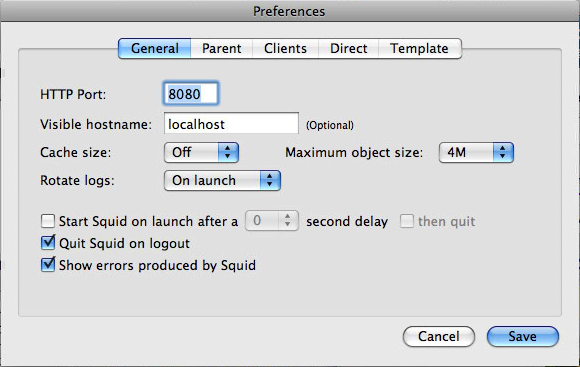 In the end, I just used the default settings, under General I put HTTP port to 8080, Visible hostame to localhost.
Under parent I put "Use a parent proxy server", hostname proxy.chesterfield.ac.uk port 8080, and ticked "Parent requires authentication. But putting username and password here doesn't seem to work. Leaving them blank asks you for a username and password when the service starts and works without putting domains in. Yay!
Tuesday, 6 July 2010
Putting photos in access records
So, I'm doing the staff photo boards for the whole college, and being as it is so large I'm going to be efficient and use a database. The first step of creating a database and putting all people in it, with the time and date of every photo taken down, so we know which photo is for which person.
Embedding the photos is not practical because apparently it converts them to bmp files which takes up a lot of disk space. So linking is the way to go. It means I'll have to have a folder for each photo shoot, which is always next to the database.
I found a nice little article which looks very simples. http://bytes.com/topic/access/answers/189710-linked-pictures. Basically, drag the photo into the field, then if you want to display it in a form you put:
on your form, create an Image object, and in Form_Current() place something like: Me![ImageFrame].Picture = Me![fImagePath]
Tried this on a test database and it was a success. Wasn't quite sure what he meant by "image object" or "Form_Current" and the rest of it, so with a little bit of trial and error I succeeded! So here's what to do:

Embedding the photos is not practical because apparently it converts them to bmp files which takes up a lot of disk space. So linking is the way to go. It means I'll have to have a folder for each photo shoot, which is always next to the database.
I found a nice little article which looks very simples. http://bytes.com/topic/access/answers/189710-linked-pictures. Basically, drag the photo into the field, then if you want to display it in a form you put:
on your form, create an Image object, and in Form_Current() place something like: Me![ImageFrame].Picture = Me![fImagePath]
2 hours later....
Tried this on a test database and it was a success. Wasn't quite sure what he meant by "image object" or "Form_Current" and the rest of it, so with a little bit of trial and error I succeeded! So here's what to do:
- Make a text field in the table where you put the location of the picture - i.e. c:\pictures\my picture.jpg
- Next make a report based on the table. I used the wizard, added the fields I wanted and went into design view.
- In the Detail section (middle bit) is where the data gets displayed. Along with the description, I put an "Image Box" found in the Controls section in the toolbars.
- It will want you to specify an image, just click "cancel"
- Click on the image container and on the right, you want to edit the "Control Source"
- I think I just selected the field with the photo location data in. Although I do remember putting:
- Me![ImageFrame].Picture = Me![Photo Location] - but I'm not entirely sure? Photo Location was the field I created in the table

Just got to work out how to tile it horizontally and vertically on a page.
Also, by default it "zooms" the image, so that it fits inside the box (no stretching). If you click on the image and set the format "Size Mode" to clip, it crops the image!! Yes! - No!, on second thoughts it puts the image up at the size the image specifies if you go on zoom and crops almost all the large images. So I put it on zoom and put no border and seethrough background. Just have to make sure all the images are the same size.
Subscribe to:
Posts (Atom)